All iPhone 16 Models to Get a Redesigned Action Button: Report


With the launch of the iPhone 15 Pro and iPhone 15 Pro Max, Apple replaced the classic Mute switch with a customizable Action Button. And now, several reports and shreds of evidence suggest that Apple is planning to add a redesigned Action Button to the entire lineup of the iPhone 16 series, which will make its debut in 2024. The Cupertino tech giant is reportedly working to add more functionality to its existing Action Button, and will also switch to a capacitive design rather than a mechanical one.


There were several rumors that Apple would switch to solid-state technology for power and volume buttons on the iPhone 15 Pro models. However, Apple ditched those plans and introduced a new Action Button instead. This button replaced the mute switch which was previously a staple for all iPhone models. Unlike the mute switch, which could only be used to switch between Ringing and Silent models, the Action Button can be configured to perform a which range of tasks.

The Rumored Action Button on iPhone 16 Series
When we didn’t see solid-state technology on iPhone 15 Pro models, it appears the “mechanical” saga will continue on iPhones. Over the past few weeks, we’ve seen numerous reports suggesting the switch from mechanical buttons to capacitive solid-state buttons is in the cards for the entire iPhone 16 lineup. This will allow Apple to add more functionality to the Action Button.

Macrumors reported that the revamped Action Button is under the codename “Altas”, and might feature the similar functionality seen on Home buttons with Touch ID on older iPhone models or Force Touch Trackpad on recent MacBooks.

The story also claims that the updated Action Button will be able to detect the changes in the pressure, all the credit goes to the new force sensor. Also, there are mentions of the “tact-switching functionality”, but at the moment, it’s unclear what this exactly means. It’s worth knowing that the iPhone 16 series is also rumored to include a new “Capacitive Button” with similar functionality.

The report also suggests that the upgraded Action Button will make its way to the iPhone 16, 16 Plus, 16 Pro, and 16 Pro Max. Even the initial prototypes of the iPhone 16 design feature an Action Button. Also, Apple experimented with different sizes for its redesigned Action Button.

With certain configurations, the Action Button was quite larger and resembled more with volume buttons. Even with different hardware configurations across different development stages, the appearance of the Action Button remained a constant. If this happens, it would mark the end of Apple’s Mute Switch era. Currently, only the iPhone 15 Pro & 15 Pro Max have the Action Button, and the iPhone 15 & 15 Plus house the same mute switch.

Moving on, the Action button is also likely to make an appearance on the iPhone SE 4, reportedly planned for 2025. It clearly means Apple has plans to eliminate the dedicated mute switch from all its future iPhones.

While these reports and pre-production information say a lot about Apple’s plans, we still are months away from the final hardware designs. The giant might change its plans, and come up with something different, which may or may not be exciting. We’ll keep you updated as the cycle evolves. For complete details on what to expect from 2024 iPhones, head to our dedicated iPhone 16 series roundup.

Read More Comments

Here’s When Apple Could Announce The iPhone 15 Lineup And Apple Watch Series 9 To The Public


The iPhone 15 and iPhone 15 Pro models will come with a boatload of major changes in terms of design and new features. The company will potentially send out event invites in the coming weeks but has not shared a word on the event date. We are now hearing that the company will host its special event on September 12 to announce the new iPhone 15 lineup and Apple Watch Series 9.

iPhone 15 event is expected to take place on September 12, while the launch is expected on September 22
Typically, Apple sets the iPhone 15 launch event date in the first half of September. Following the announcement, the devices go on sale a week after. While the company has not announced its dates yet, prominent industry analyst Mark Gurman states that Apple will host its iPhone 15 launch event on September 12. Additionally, it will likely be an in-person event, similar to the WWDC 2023 event in June. It will potentially be a pre-recorded event, following the same format as 2022.

It was previously coined by the analyst that the event could take place on either September 12 or 13 but in his latest tweet, Gurman suggests that "signs are increasingly pointing to Sept.12" as the iPhone 14 launch event date. However, he also mentions that these are mere speculations and that the company could announce the event at another date.

If the company does hold its special event on September 12, it would mean that the devices will be available for pre-order on the 15th while the devices will hit the shelves on September 22. However, as the analyst notes, be sure to take the news with a grain of salt since the final word rests with Apple. At the event, the company will announce its highly anticipated iPhone 15 and iPhone 15 Pro models alongside the Apple Watch Series 9 and Apple Watch Ultra 2.


The iPhone 15 models are expected to bring Dynamic Island with upgraded internals and an improved camera system. Additionally, USB-C would replace the Lightning port on the entire lineup. For the 'Pro' models, we are expecting a 3nm A17 Bionic chip for enhanced performance and efficiency alongside upgraded camera sensors for better low-light photography. In terms of design, the iPhone 15 Pro will feature a new Action Button instead of the Mute Switch enclosed in a grade 5 titanium housing.

These major changes would potentially make the iPhone 15 lineup worth the upgrade, but the company is also expected to increase the prices. The iPhone 15 models could see a minor price increase, while the 'Pro' models are speculated to go up by as much as $200. We will be covering the iPhone 15 launch event in extensive detail, so be sure to stick around.
Read More Comments

Does Apple Watch Track Blood Pressure? What You Need To Know

Does Apple Watch Track Blood Pressure? What You Need To Know

The Apple Watch is a health and fitness-centric smartwatch that features a collection of sensors used to detect some of the wearer's vital signs, but is blood pressure monitoring supported? Apple's lineup of smartwatches includes health features that can vary based on the model and series, and the company typically improves on these with each upgrade. The Apple Watch SE, a cheaper version of the smartwatch with slightly limited features, has its own functionalities separate from the standard Apple Watch.

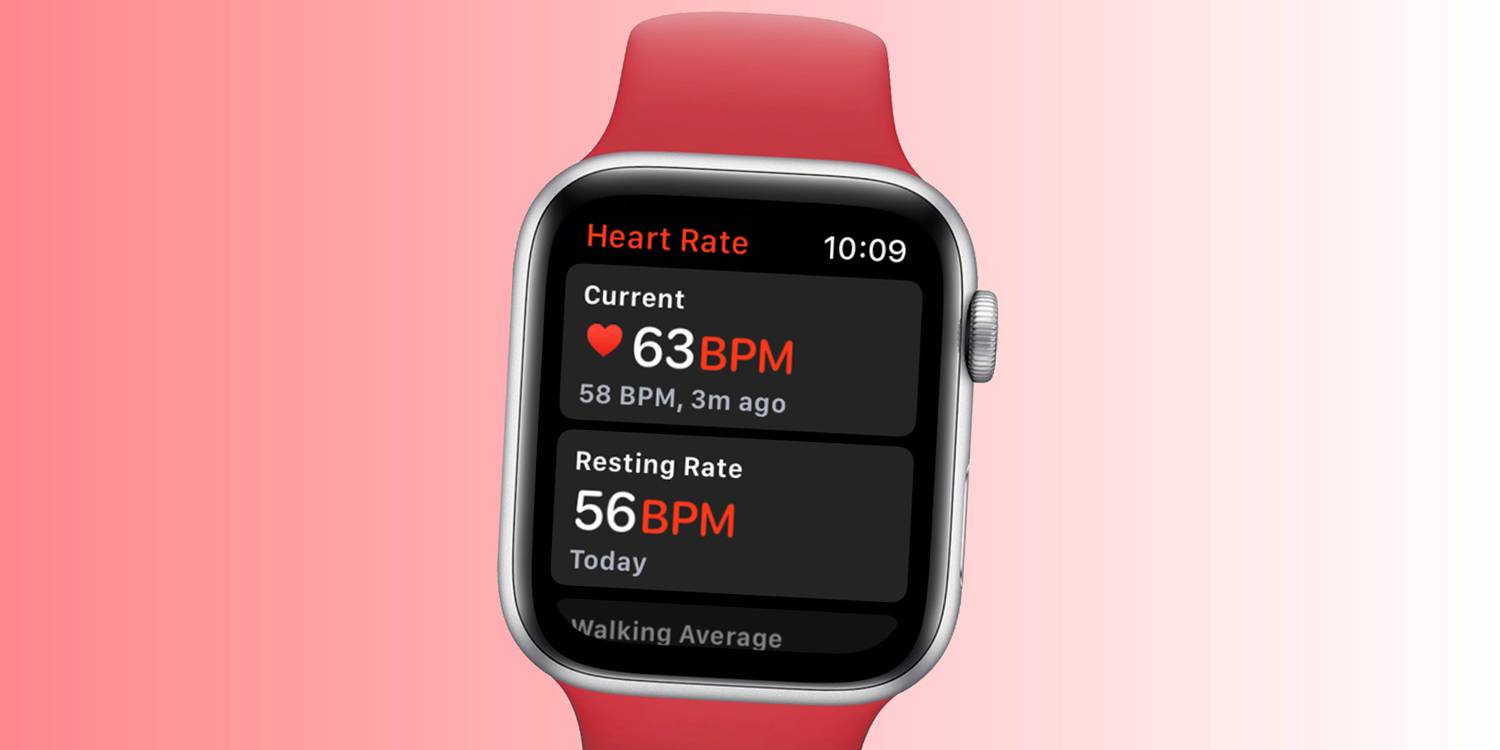
Though the Apple Watch features a collection of health sensors — from a heart rate sensor to an electrocardiogram to a blood oxygen sensor — true blood pressure monitoring is not supported on the smartwatch. A few applications claim to provide the functionality, but they fall short unless an external blood pressure monitor is connected. As per Bloomberg's Mark Gurman, Apple plans to add blood pressure monitoring to the Apple Watch in the future along with other health sensors. These include blood glucose monitoring and blood alcohol tracking, but some of these features require government approval before being released to the public.

View BP Data On Apple Watch With An App


The Apple Watch doesn't provide a blood pressure monitor, but it does include a heart rate sensor and an electrocardiogram. This is good news for people concerned about hypertension, since heart rate and blood pressure have a positive correlation, according to a study by the University of Minnesota (via NCBI). Researchers concluded that "elevated heart rate is associated with increased peripheral blood pressure, increased risk for cardiovascular disease, and is modifiable." That means Apple Watch users might be able to get an idea of their blood pressure state through heart rate readings. However, if someone is concerned about their blood pressure or needs to track it for health reasons, using appropriate medical equipment is recommended.

There are also legitimate ways to track blood pressure using an Apple Watch, even though it isn't possible on-device. Third-party blood pressure monitors from brands like QardioArm, Withings, and iHealth can connect to Apple's Health app on the iPhone to provide blood pressure data. This data can then be viewed on the wearer's wrist with an Apple Watch app, which can be useful for constant monitoring. They work similarly to other health monitors, like constant glucose monitors, that continually collect data that can be viewed on Apple Watch.

Although the Apple Watch doesn't include a blood pressure monitor yet, it can still provide a solid picture of the wearer's heart health. Apple Watch wearers can use the device to check their heart rate at any time, whether on demand or while doing an activity. Those who are actively monitoring these stats can also set up notifications so the watch will alert them if their heart rate drops too low or climbs too high. With newer versions of the Apple Watch software, watOS 5.1.2 or later, wearers can also use the device to monitor their heart rhythm and receive notifications about irregular patterns. With Series 4 Apple Watch and more recent models, users can also take an electrocardiogram using the watch and Apple’s ECG app.

Source: Apple, NCBI
Read More Comments

This Is Why The iPad 10th-Generation Doesn’t Work With Apple Pencil 2


Apple's 10th-generation iPad features USB-C and a design similar to the iPad Pro and iPad Air, but why does it only support the Lightning-enabled first-generation Apple Pencil? The 10th-generation iPad surprised both buyers and reviewers with its inclusion of a front-facing landscape camera, which is a first on any iPad. More importantly, this feature is absent on the higher-end iPad Pro models. Since the 10th-gen iPad added a landscape camera without supporting the Apple Pencil 2, it was natural to wonder whether the two features were connected.

The uncertainly surrounding the lack of Apple Pencil 2 support on the 10th-generation iPad was put to rest by iFixit, which posted a teardown of the tablet. After iFixit removed the display and glass from the main chassis, the problem with the 10th-generation iPad's design became apparent. The components for the iPad's landscape camera were housed in the same general area as the wireless charging coil within the iPad Pro and Air. This magnetic, wireless charging window makes it possible for the Apple Pencil 2 to pair and charge on those iPads. The inclusion of the landscape camera on the 10th-generation iPad all but prevented the second-gen Apple Pencil from connecting in its usual location.


Can Apple Move The iPad's Magnetic Connector?


The natural solution to this problem appears to be moving the Apple Pencil's magnetic connector on the iPad, but iFixit's Shahram Mokhtari says this isn't possible. "As it stands, the magnets on the Apple Pencil 2 don't quite line up with the iPad 10's magnets," Mokhtari says in the video. "The wireless charging coil would be sitting in the center, but if it were to be moved down, you could theoretically have a Pencil that could attach here." However, the teardown specialist finds another potential issue with moving the Apple Pencil's magnetic connector down the iPad's chassis. "But then, the wireless charging coil would interfere with the magnet placement."

With this information kept in mind, it seems that Apple decided the addition of a landscape camera to the base-model iPad was more important than Apple Pencil 2 support. But since the higher-end iPads Air and Pro utilize a similar form factor to the new iPad 10, this creates an interesting dilemma for the company. If Apple felt that the landscape camera was important enough to appear on the base model iPad, surely customers can expect it to appear on more expensive variations. iFixit's teardown of the 10th-generation iPad not only proves why it doesn't have second-gen Apple Pencil support, but also why higher-end iPads will need a redesign before getting a landscape camera.

Which Apple Pencil Works With iPad 10th-Generation?


iPad 10th-generation users who want to use an Apple Pencil will need to buy the outdated first-gen Apple Pencil that charges via a Lightning port. However, since the 10th-gen iPad has a USB-C port, this necessitates the use of an adapter to connect and charge the Apple Pencil. It's an awkward, clunky solution, but one Apple felt was justified.

Apple now ships the Apple Pencil (first-gen) with a Lightning to USB-C adapter in the box. To connect the Apple Pencil to the iPad 10th-gen, users will need to plug the Apple Pencil into the adapter's Lightning port, and connect the iPad to the adapter's USB-C port using a USB-C cable. This means that iPad 10th-gen users will need to carry both the adapter and a USB-C cable to charge the Apple Pencil or pair it in the event it gets unpaired.


Read More Comments

M1 Mac Mini Vs. M2 Mac Mini: Should You Upgrade?

mac-mini-m1-vs-m2-1

Apple has announced a new Mac mini that comes in a choice of either M2 or M2 Pro chips, but how does it compare to the Mac mini with an M1 processor? The first Mac mini powered by an Apple chip was released in 2020. Less than a year later, there were reports that Apple was planning to launch a more powerful model in 2022, but after a short delay, the new mini PC is finally here.

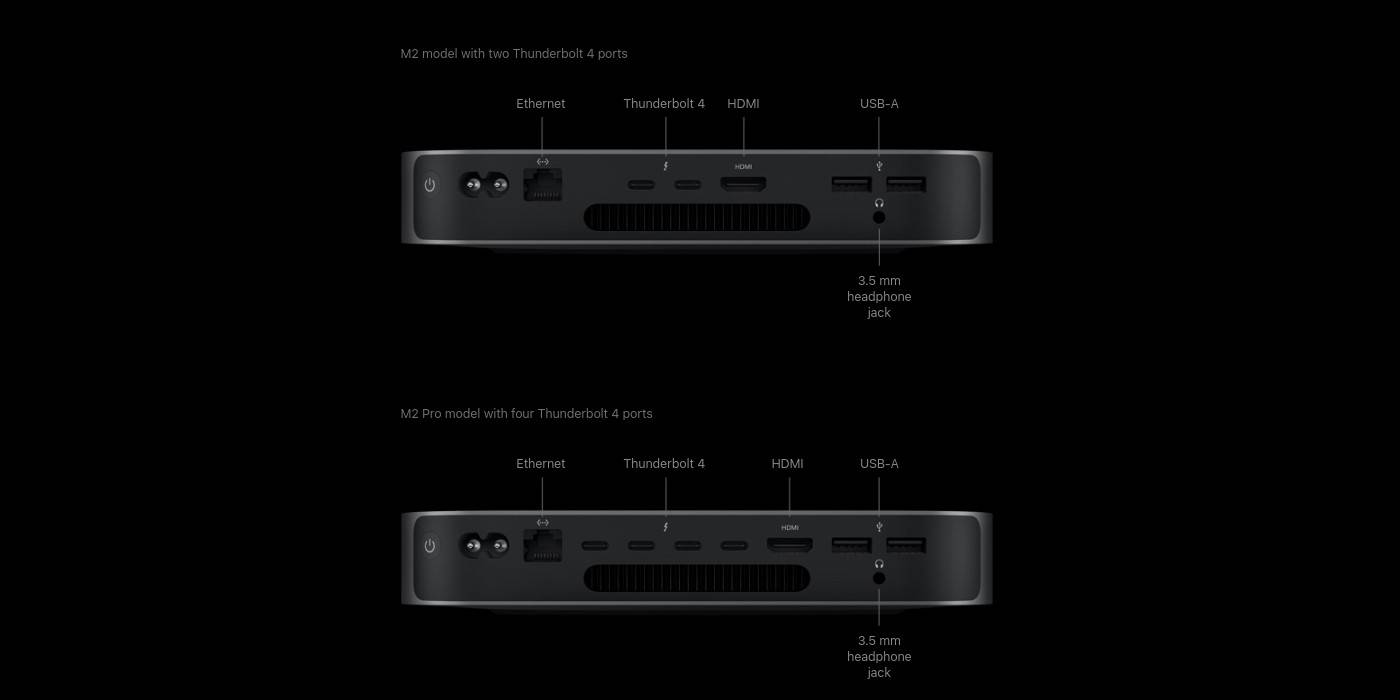
The M2 Mac mini doesn't look visually different from the M1 Mac mini. It has the same aluminum body, and the arrangement and number of ports remain unchanged. However, there are some differences on the M2 Pro model. Although it has the same design, it packs more ports. The ports on the M2 Mac mini include Ethernet (configurable up to 10GB), two Thunderbolt 4 ports (replacing the Thunderbolt 3 ports on the M1 Mac mini), two USB-A ports, and a 3.5mm headphone jack. The M2 Pro Mac mini differs with the addition of two extra Thunderbolt 4 ports.

M2 Models Bring Big Improvements


The inside is where the M2/M2 Pro Mac mini greatly differ from the M1 Mac mini. The base model of the M2 Mac mini has an 8-core CPU, a 10-core GPU, and a 16-core Neural Engine. It also has 8GB of RAM and 256GB of storage. However, buyers can choose to configure it with up to 24GB of unified memory and up to 2TB SSD storage. Buyers should note that the Mac mini's storage can't be upgraded after purchase.

On the other hand, the base model of the M2 Pro Mac mini has a 10-core CPU, a 16-core GPU, and a 16-core Neural Engine. A 12-core CPU and 19-core GPU version is also available. Furthermore, the M2 Pro Mac mini's memory bandwidth of 200GB/s is twice that of the M2 model, and more than three times the 66.67GB/s memory bandwidth of the M1 Mac mini. It can also be configured to up 32GB of memory and up to 8TB of SSD storage. The M1 Mac mini has up to 16GB of RAM and up to 2TB of storage.

With the new M2 Mac mini, users will be able to connect up to two displays – one display with up to a 6K resolution at 60Hz over Thunderbolt and a second display with up to 5K resolution at 60Hz over Thunderbolt or 4K resolution over HDMI. The M1 Mac mini also supports up to two displays, but the second display peaks at 4K 60Hz and must be connected over HDMI. For the M2 Pro model, there is support for up to three displays. Users can also connect a single display with an 8K resolution at 60Hz, a first for the Mac, or even 4K at 240Hz. With the newer Wi-Fi 6E and Bluetooth 5.3 technology of the M2 and M2 Pro Mac mini models, users should experience better connectivity than the M1 Mac mini which has Wi-Fi 6 and Bluetooth 5.0.

The M2 Mac mini is not only more powerful than the M1 Mac mini, but it has also been launched for an even cheaper price. It starts at $599 (students can get it for just $499), compared to the M1 model which had a launch price of $699. Based on these factors, it is no surprise that Apple has already discontinued the M1 Mac mini. However, the M2 Pro Mac mini starts at a more expensive price tag of $1,299 as a result of its more powerful chipset and additional RAM and storage. While existing M1 Mac mini users might not see much point in upgrading to the M2 Mac mini, those looking for a more powerful mini PC can consider switching to the M2 Pro model.


Read More Comments

Apple Watch SE 2: Battery Life & Charging Times, Explained

Apple Watch SE 2: Battery Life & Charging Times, Explained

At the Far Out special event, Apple released the second generation of Apple Watch SE. But does it last more than the original Apple Watch SE (2020)? Battery life is one of the most crucial aspects of a wearable device as it decides how frequently the user will plug the device into a power source.

Along with the Watch SE, Apple also unveiled the Watch Series 8 and its rugged smartwatch, the Apple Watch Ultra. While the Apple Watch Series 8 offers up to 18 hours of usage on a charge, the Apple Watch Ultra goes up to 36 hours, which can be extended to 60 hours with the low power mode.

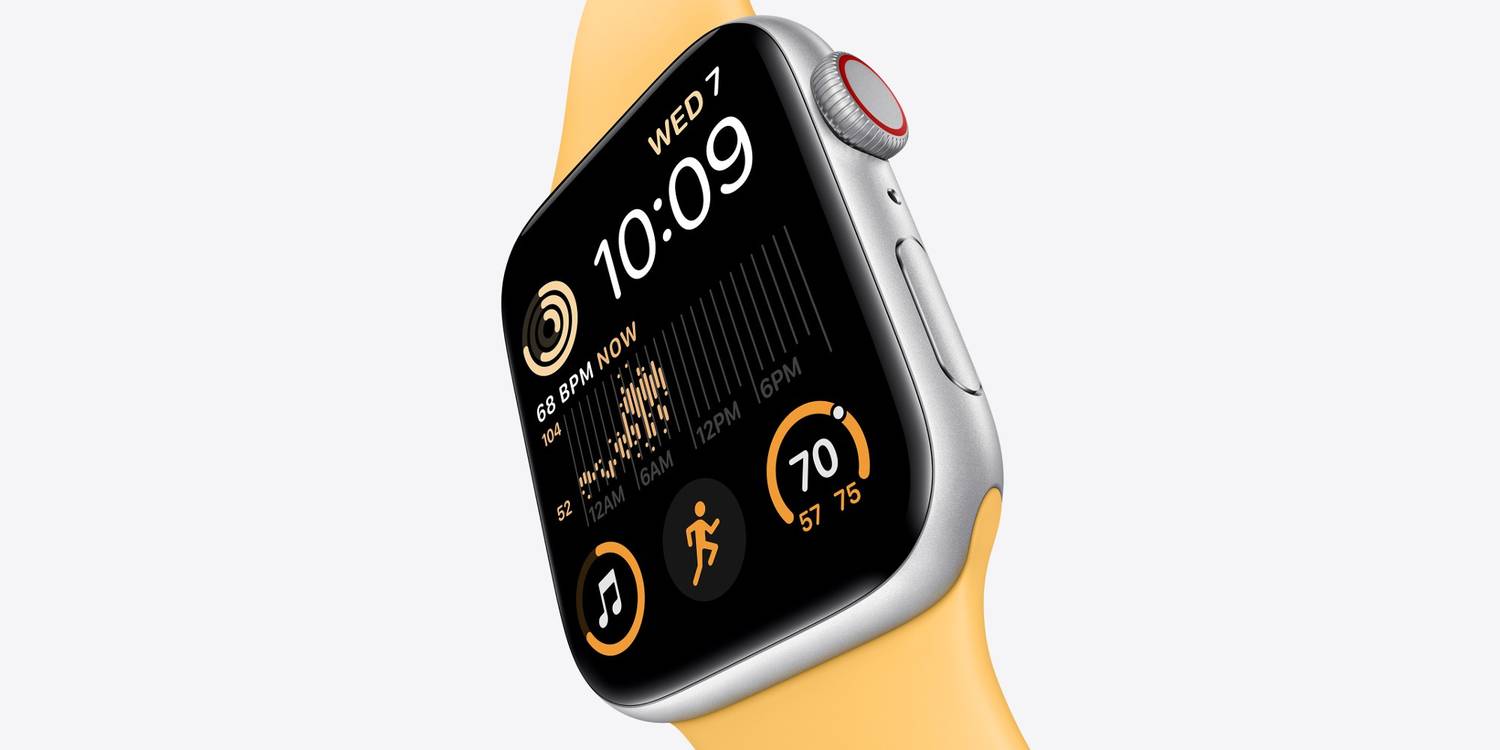
As it turns out, Apple promises the same battery life for the Apple Watch SE 2 as it does for the Apple Watch SE (2020), i.e., "18 hours after an overnight charge." This includes up to 90-time checks, 90 notifications, a 60-minute workout with music playback and 45 minutes of app use. As per tests conducted by Apple in August 2022, Watch SE is rated to last up to 1.5 hours on a call via LTE. However, the Watch SE provides a maximum of 10 hours of audio playback from offline storage. In comparison, the latest Watch Series 8 provides up to 11 hours of audio playback. In terms of workout, the affordable Watch SE can record information for up to 10 hours during indoor exercise and up to six hours during outdoor activity with GPS — an hour less than what the Apple Watch Series 8 offers. Although the company lists these numbers on its official website, the battery life depends upon usage patterns and may differ from user to user.


The Low Power Mode Should Increase The Battery Life On Watch SE


While the new Watch SE does not come with an improvement in battery life, Apple has released a new Low Power Mode for all models that support watchOS 9. The Low Power Mode should help users get more out of their Apple Watch SE. The Watch Series 8 can last up to 36 hours on the Low Power Mode by disabling features such as an always-on display and automatic workout detection. However, it is essential to highlight that Apple does not mention how long can the Watch SE last in the Low Power Mode. A report by MySmartPrice states that the Apple Watch SE (40mm) has a 245 mAh battery while the Apple Watch Series 8 (41mm) has a 282 mAh battery. This difference in battery capacity (about 15 percent) should also reflect users' effective battery life on both the regular and the low-power modes. Hence, users should expect the new Watch SE's battery life to fall slightly behind the Apple Watch Series 8.

Regarding the charging time, the Apple Watch SE is not as fast as other models released in 2022. When used with the 20W USB-C Power Adapter, the Apple Watch SE takes about 1.5 hours to reach 80 percent and about 2.5 hours for a complete charge. With the Apple Watch SE, users get a Magnetic Charging USB-C Cable, but the power brick is not included in the box and costs $19. In contrast, the Apple Watch Series 8 takes about 45 minutes to charge up to 80 percent and about 75 minutes to reach 100 percent.

Read More Comments

This App Will Add Apple's Dynamic Island To Your Android Phone

This App Will Add Apple's Dynamic Island To Your Android Phone


A new Android app called dynamicSpot promises to bring the iPhone 14 Pro's Dynamic Island to any Android device. Ever since Apple launched the iPhone 14 series with a host of new features, the one design element that caught everyone's attention is the Dynamic Island. Unfortunately, it is only available in the Pro and Pro Max models, while the two base models still retain the age-old notch at the top. Nevertheless, the new feature is already so popular that Chinese smartphone makers like Xiaomi and Realme are asking users whether they'd like to see something similar in their Android devices in the future.

The Dynamic Island is already being put to good use by developers, who have come up with various apps and games that take advantage of the new design element. One such developer is Kriss Smolka, who just released a new game called 'Hit The Island' that requires players to hit the Dynamic Island with a virtual ball as many times as possible. The feature is also supported by a host of third-party apps, including Spotify, YouTube Music, WhatsApp, Instagram, Skype and more. In-house Apple apps that support the feature include AirDrop, AirPlay, Apple Music, etc.

Android app developer and XDA senior member Jawomo has released an app called dynamicSpot that brings Dynamic Island-style notifications to Android devices. The tool enables users to access notifications and phone status through a floating card at the top of the screen in a manner that looks very similar to how the Dynamic Island works on the iPhone 14 Pro. It is compatible with all punch-hole camera cutouts, whether at the center or the corner. In both cases, the camera cutout is engulfed by an oblong 'dynamic spot' that looks eerily similar to the Dynamic Island. The island is at the center by default, but users can also shift it to a corner if they want.


Dynamic Island For Android Phones


The free version of dynamicSpot comes with many customization options that allow users to choose the notifications they see, change the size of the island, and more. There's also a paid version that costs $4.99 and offers more features, such as an option to see the dynamic spot on the lock screen, as well as various single-tap and long-press actions.

The app is currently in beta, meaning it will likely have a few bugs and glitches that should be sorted out in the coming days and weeks. The developer also admits as much, saying that some animations may not be as smooth as expected. However, for people who want a Dynamic Island on their Android phone, dynamicSpot offers a great option that is worth checking out.


Read More Comments

YouTuber Tests iPhone 14 Crash Detection By Crashing An Actual Car


A popular YouTube channel has tested the iPhone 14's crash detection feature by crashing an actual car with an iPhone 14 Pro strapped inside. Announced earlier this month at Apple's Far Out event, the iPhone 14 lineup comes with several new features and upgrades over the iPhone 13 series, although most of them are reserved for the Pro and Pro Max models. Thankfully, Crash Detection is one of the few new features available across all four iPhone 14 models.

To detect crashes, Apple is using a slew of sensors in the iPhone 14, including a new dual-core accelerometer and gyroscope. The system can reportedly detect impacts up to 256G, which is a lot by any standard. Once the device detects a crash, it displays an alert and automatically initiates a call to emergency services after 20 seconds unless canceled. If the user is unresponsive, the device plays an audio message to inform the emergency services about the crash and sends them the crash site's latitudinal and longitudinal coordinates with an approximate search radius. Alongside the iPhone lineup, the crash detection feature is also available on all the Apple Watch models launched this year.

YouTuber TechRax, which has more than 7.6 million subscribers on the platform, posted a six-minute-long video of a real-world experiment that tested the crash detection feature of the iPhone 14. The YouTuber used an iPhone 14 Pro for the test that involved crashing a car multiple times to see if the feature works as advertised. The device was strapped to the back of the driver's headrest at the time of the crash.


iPhone 14 Real-World Crash Detection Test


Thankfully, the YouTuber knew better than to endanger themselves and their friends in the test, and therefore used a remote-control setup to drive an empty car and ram it against a bunch of old wrecks in what looked like a large, open junkyard. After every crash, the feature worked as advertised, detecting the collision and starting a 10-second timer to call emergency services.

Once the crash detection kicked in, the phone displayed a message that read, "It looks like you've been in a crash," before the timer started. The video also documents how the YouTuber had to rush to the car after every crash to disable the call. Overall, the video is the perfect confluence of tech and demolition derby and is immense fun to watch. More importantly, it proves that the iPhone 14's crash detection feature works in real-world scenarios, which is good news for would-be users.

Source: TechRax/YouTube

Read More Comments

How To Fix The 'Last Line No Longer Available' Error On iPhone 14


Apple iPhone 14 hit the stores a few days ago, but users are already facing issues with their units, including the 'Last Line No Longer Available' error. The error has existed since Apple released its first dual SIM iPhones, i.e., the iPhone Xs and the iPhone Xs Max, in 2018.

Ever since, it has appeared on all the iPhone models that support two SIM cards, including the iPhone 11, iPhone 12, iPhone 13 and the iPhone 14. The error occurs when users try to make a call from their contacts or recent call lists, but the iPhone cannot access the last line used to make a call. It is accompanied by a message that reads, "Do you want to call using your remaining line," which is the secondary SIM.

Early adopters of the iPhone 14 are facing the 'Last Line No Longer Available,' which does not allow users to make calls. As per a thread posted by Apple Community Specialist, the issue seems to be related to the dual SIM feature on the iPhone 14. While it should not occur in the first place, there are a couple of things that users can do to fix it. First, delete the recent call log if the error message comes when calling people from the Recent Calls list. To do so, head to the Phone app, tap on Edit in the top right corner, and select Clear. Then, in the prompt that shows up, tap on Clear All Recents. Once done, reboot the iPhone and try calling someone. While this should fix the 'Last Line No Longer Available' issue, there are other ways.


Toggle The Airplane Mode and Wi-Fi Calling To Fix Error


Enabling and disabling the Airplane Mode through its toggle in the Control Center forces an iPhone to reconnect to cellular services, which might solve the error in concern. Similarly, toggling the Wi-Fi Calling option on an iPhone may work for some users. In case it does not, reset the network settings on the iPhone. While this does not wipe out any personal data, it clears information related to the mobile plan, VPN and Wi-Fi credentials. Next, open Settings, tap on General, select Transfer or Reset iPhone and then select Reset. On the next screen, tap Reset Network Settings. While this should resolve the 'Last Line No Longer Available,' don't panic if it does not.

For those operating two eSIMs on their iPhone 14, manually selecting the line before making a call might make a difference, especially if the user does not have an active voice plan on one of the lines. Tap on the 'i' icon beside the contact and select the Preferred Line from the available options. Other workarounds involve a hard reset and updating the iPhone to the latest version of the iOS released by Apple. To force a restart of the iPhone 14, press and immediately release the volume up button, then the volume down button, and finally, hold the power button until the Apple logo appears on the screen. If the 'Last Line No Longer Available' error persists, contacting Apple Support will be the best idea.


Read More Comments

The Dynamic Island Could Be Coming To All iPhone 15 Models

Apple will reportedly include the Dynamic Island on all iPhone 15 models next year. Apple ditched the notch on the iPhone 14 Pro and 14 Pro Max in favor of a pill-shaped cutout called the Dynamic Island that has already become the highlight feature of the new devices. The base iPhone 14 and iPhone 14 Plus, however, miss out on the new feature as they still retain the age-old notch that was first introduced with the iPhone X in 2017. Ever since the iPhone 14 series was announced earlier this month, the Dynamic Island became a topic of intense conversation on social media, with most people seeming to approve of Apple's new design philosophy.

In fact, the new feature is so popular that a third-party Android theme developer has already copied it and created a Dynamic Island-style notification area for Xiaomi phones. What's more, iOS game developers are also embracing the new Dynamic Island and are developing games that take advantage of it. One such game developer is Kriss Smolka, who is working on a new title called 'Hit The Island' that requires players to hit the Dynamic Island with a virtual ball in a game that very closely resembles 'Pong.' Overall, the Dynamic Island is not without its critics, but it is certainly an improvement over the massive notch used by the last few generations of the iPhone.

According to display supply chain analyst Ross Young, Apple will include the Dynamic Island on all iPhone 15 models, and not just the Pro and Pro Max variants, unlike what it did with the iPhone 14 lineup this year. Young also claimed that the base iPhone 15 models (presumably the iPhone 15 and 15 Plus) will not get a 120Hz LTPO display that enables the iPhone 14 Pro’s ProMotion feature and Always-On display because the "supply chain can’t support it."

The Dynamic Island Could Go Mainstream In 2023


If Young's claim is correct, it would mean that the Dynamic Island could be standard across the entire iPhone 15 lineup, even though Apple might still differentiate between the Pro and non-Pro models by reserving the iPhone 14 Pro's Always-On display and the 120Hz refresh rate for the higher-priced models.

While design parity among all iPhone models is a welcome move, it's not immediately clear whether Apple will also bring a few of the other iPhone 14 Pro features to the base models next year. That includes the 48MP primary camera which will also likely remain exclusive to the iPhone 15 Pro and 15 Pro Max models next year.
Read More Comments

Why The iPhone 14 Pro's Always-On Display Isn't Working & How To Fix It

Why The iPhone 14 Pro's Always-On Display Isn't Working & How To Fix It


The iPhone 14 Pro and Pro Max have an always-on display that stays on most of the time except in a few situations. The always-on display in the iPhone 14 Pro and Pro Max isn't a particularly innovative addition in terms of the broader smartphone market, as it has already been available in many Android smartphones for years. However, its addition to the new flagship iPhones is still a welcome move, as it is a handy feature that enables users to check the time, notifications, weather and other details with just a glance at the device without having to operate it in any way.

Apple announced the iPhone 14 lineup at its Far Out event in September alongside many other gadgets, including the Watch Series 8, the Watch Ultra, the Watch SE and the AirPods Pro 2. The iPhone 14 lineup includes four models like the past couple of years, but this time, Apple got rid of the 'mini' in favor of a 'Plus' model in keeping with market demand for large-screen smartphones. Alongside the Plus model and the vanilla iPhone 14, this year's lineup also includes the iPhone 14 Pro and iPhone 14 Pro Max, which come with a new design language and a ton of new features, while the two base models retain the design and even some old hardware of their predecessors.

The iPhone 14 Pro's always-on display is meant to remain on even when the phone is not in use, but there are a few scenarios where it turns off to save battery. According to an official Apple support document, the always-on display on the iPhone 14 Pro and Pro Max turns dark when the device is lying face down or is inside the owner's pocket or a bag. The feature also turns off when Sleep Focus is on and when the iPhone is connected to Apple CarPlay. The always-on display also turns off when the Continuity Camera is in use.


Always-On Display In The iPhone 14 Pro


Apart from the situations mentioned above, the always-on display on the iPhone 14 Pro and Pro Max turns off when the device hasn't been used for a while and when the phone detects that the user has moved away from it with a paired Apple Watch.

According to Apple, the iPhone 14 Pro and iPhone 14 Pro Max can learn the user's activity patterns and turn the always-on display off and on accordingly. In addition, the always-on display works with alarms and sleep schedules set by the user.


Read More Comments

All The Running Features On The Apple Watch Ultra, Explained


The Apple Watch Ultra is the first Apple smartwatch that can keep up with extreme athletes and outdoor explorers — and a slew of features designed to improve a runner's performance makes it an excellent fit for marathoners. Though each model of the Apple Watch is centered around health and fitness functionality, there are certain features that runners need to perfect their craft. For beginners and casual runners, the standard editions of the Apple Watch can be a great way to track a runner's early progress. But eventually, serious runners will outgrow the base Apple Watch models, needing advanced features and longer battery life. These athletes can now look to the Apple Watch Ultra, a new model designed for people who need more out of their smartwatch.

Since the very first Apple Watch was released, there have been ways to track running progress on the device. Apple has its own Workout app that can track multiple types of running workouts, but there are also third-party options. Nike Run Club and Strava are popular alternatives to Apple's built-in solution and provide a better experience in terms of community interaction and sharing between users. However, Apple's Workout app has grown to be more capable in recent years. Some features are available on many Apple Watch models through software updates, but others are exclusive to the Apple Watch Ultra.

Many of the features that highlight the Apple Watch Ultra's functionality are coming to many models through watchOS 9, a software update that rolled out on Sept. 12, 2022. The update adds features crucial to interpreting and adjusting a runner's form, including vertical oscillation and stride length. Vertical oscillation is when the torso moves while running, and an extreme amount of movement results in unnecessary exertion and worse performance. With each step, it can also measure ground contact time with the latest software to tell runners whether they are staying on the ground for too long. Stride length is also vital for runners, but the ideal stride length varies from person to person. Both data points are best analyzed by a professional, but experienced runners can interpret this data to improve performance.


Apple Watch Ultra Has Advanced GPS & Battery Life


There is no doubt that Apple Watch Ultra will track runs more accurately than other Apple Watch models — especially in metropolitan areas or dense forests — and that's due to advanced GPS technology. Most devices, including other Apple Watches, use the L1 GPS frequency to track location. This works well in most instances, but the GPS can get confused when it is obstructed by tall buildings or thick forestry. Apple Watch Ultra adds the L5 frequency, which works in tandem with the L1 frequency, to reduce GPS tracking errors and ensure a consistent GPS connection. GPS data is important for runners as it tracks key statistics like average pace, time and distance.

All of these features available on the Apple Watch Ultra only matter if the device can stay powered on for the duration of a workout, and that's a genuine concern for long-distance runners. Previous versions of the Apple Watch would not last for the length of a marathon (26.2 miles), and many long-distance runners train at distances between 10 and 30 miles. The Apple Watch Ultra's battery life is far superior to any other Apple Watch model, lasting for up to 36 hours in regular use and up to 60 hours in a low-power mode coming later this year. The smartwatch can last long enough to complete a full Iron Man Triathlon — a 2.4-mile swim, a 112-mile bike ride and a marathon. Apple Watch Ultra comes with the advanced metrics serious runners use to run faster and longer, and it finally has the battery life needed to keep up with them.


Read More Comments

The iPhone 14 Pro's Dynamic Island Has Already Been Copied For Android

The iPhone 14 Pro's Dynamic Island has been copied by an enterprising developer for select Android phones. Last week, Apple unveiled its iPhone 14 lineup with a myriad of features, most of which are reserved for the Pro and Pro Max models. One such feature is the 'Dynamic Island' that replaces the notch at the top of the iPhone 14 Pro's screen. The oblong cutout houses the front-facing camera and the Face ID hardware, but Apple also designed animations around it to make notifications and status indicators appear as if they're popping out of it.

Apple and Android vendors have both copied features from each other over the years, with many iPhone features and design elements often showing up on Android devices. One such example is the infamous notch that Apple introduced with the iPhone X in 2017 before being subsequently copied by almost all Android vendors, barring Samsung. Likewise, Android vendors have followed Apple's decision to ditch the 3.5mm headphone jack in what has generally been a relatively unpopular decision among consumers.

As spotted by TechDroider's Vaibhav Jain, a Mi Theme developer created a Dynamic Island-style notification area for Android devices running Xiaomi's proprietary MIUI skin. It is currently unavailable for download but is under the review process by Xiaomi before it can be listed on the Mi theme store to be downloaded by MIUI users. Jain further revealed that the new theme is called Grumpy UI, which is entirely in Chinese. It's unclear if that will change when the app is listed on the Mi Store.

Dynamic Island In Xiaomi Phones?


Thanks to the openness of the Android ecosystem, it is possible to skin it almost any way. That means iOS launchers, themes and icon packs are available aplenty on the Play Store and other Android app stores. While there's still no notable, high-quality Dynamic Island-style app on the Play Store, it is probably only a matter of time before that happens. While the current Grumpy UI app is only meant for Xiaomi devices, similar apps on the Play Store could pave the way for about any Android device to get the new feature.

According to Apple, the Dynamic Island offers a "shape-shifting, multitasking, head-turning, game-changing iPhone experience" that consolidates the user's notifications, alerts and activities into one place on the phone. Apple's Dynamic Island software also enables it to expand and contract to show important notifications at a glance before being neatly tucked away again.
Read More Comments

What Is The Dynamic Island On iPhone 14 Pro?

What Is The Dynamic Island On iPhone 14 Pro?

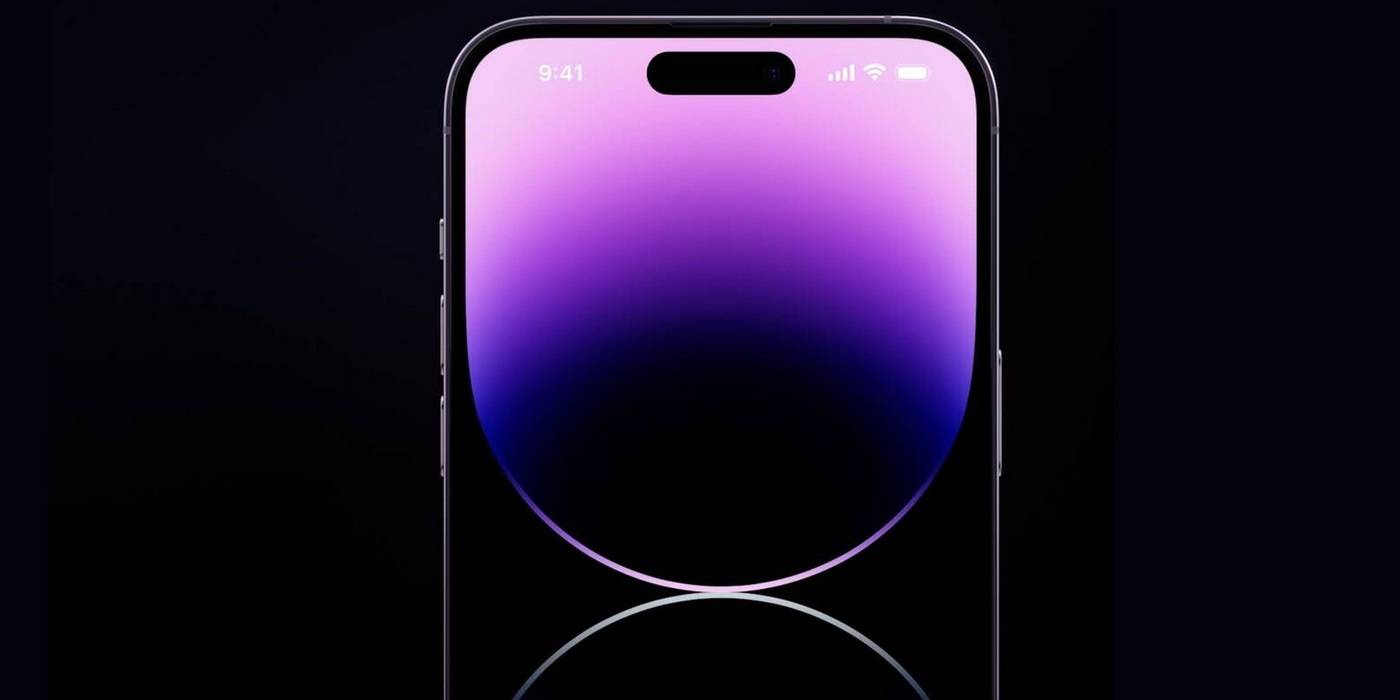
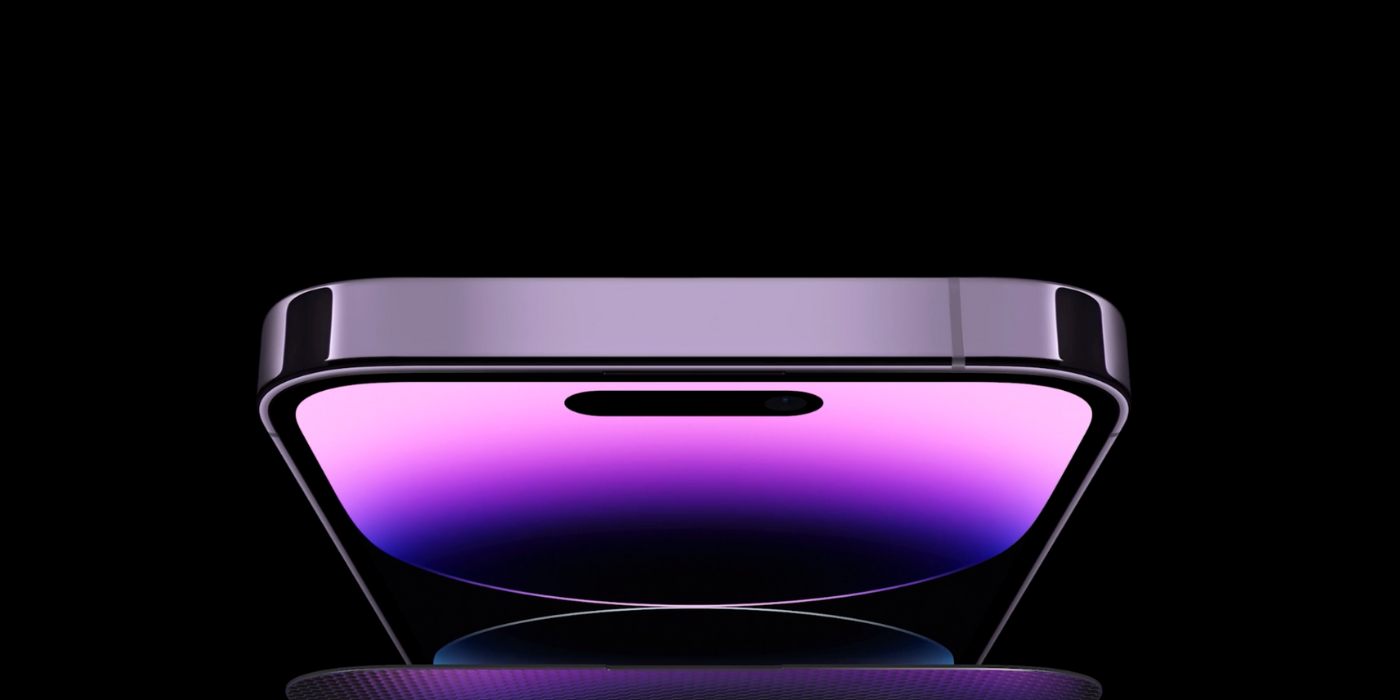
Pill-shaped camera cutouts have been on Android smartphones for years as an alternative to a notch, but Apple reimagines this trend with Dynamic Island. It's a user-interface change that naturally incorporates the cutout into the operating system rather than ignoring its existence. The Dynamic Island was added to the iPhone with the release of the iPhone 14 Pro and iPhone 14 Pro Max. While the iPhone 14 and 14 Plus look virtually identical to their predecessors, the iPhone 14 Pro series switches up the iPhone's display for the first time since 2018. In addition, Apple reduced the size of the Face ID sensors in the iPhone, allowing them to shrink the notch into a pill.

Part of the reason Dynamic Island works is because the pill-shaped cutout on the iPhone 14 Pro isn't a pill. Instead, the hardware comprises a smaller pill-shaped cutout and a hole punch cutout, forming a horizontal 'i' in the display. But these cameras and sensors are connected through software, thanks to the iPhone's organic light-emitting diode (OLED) display. Each picture can be turned off with OLED displays, resulting in deeper blacks. As a result, Apple can shut off the display area between the two cutouts to create a uniform look — and provide added functionality in the space between.

While many companies try to make the front-facing camera cutouts on smartphones as small as possible, that isn't a realistic goal for Apple. Their Face ID camera tech is made possible by True Depth sensors that are more than just a front-facing camera. That supports a Face ID security standard that is so secure the margin of error is listed as one in a million, according to Apple Support. At this time, these cameras and sensors can only be so small. To combat an intrusive notch or pill-shaped cutout, Apple developed user-interface elements that hide the display obstruction by embracing it.


Dynamic Island Explains Recent iOS Changes


The iOS user interface was shifting towards the Dynamic Island long before the feature was announced alongside the iPhone 14 Pro and Pro Max. All sorts of notification bubbles across the operating system changed to become rounded as the incoming call interface and direction prompts from Maps. This was to accommodate an eventual Dynamic Island, which morphs the pill-shaped cutout to fit current activities. The pill-shaped cutout grows to include different status icons as needed, like a Now Playing symbol or a timer countdown. The virtual space between the two cutouts is also used for a green status light that shows when the camera is being used, like those found on a Mac.

The Dynamic Island will also work with Live Activities, a much-anticipated feature coming to iOS 16 later this year. Live Activities will pull time-sensitive information from third-party apps and present the status updates in the Lock Screen and Dynamic Island. For example, these Live Activities can deliver updates on a ride-share or delivery order and the score of a professional sporting event. In addition, background activities will now be integrated seamlessly and unobtrusively in the area surrounding the pill-shaped cutout, which is an excellent way to maximize the screen area lost by cameras and sensors.

Read More Comments

iPhone 14 Vs. iPhone 14 Pro Max: Should You Spend An Extra $300?

iPhone 14 Vs. iPhone 14 Pro Max


The iPhone 14 and iPhone 14 Pro Max are here, but should you buy the standard iPhone or pay $300 more for the top-end Pro variant? Over the last two generations, Apple has brought the heat to other phone brands. The only choices for Apple's most devoted customers are choosing between standard and Pro devices and deciding whether it's time to upgrade.

During Apple’s ‘Far Out’ event, the company dropped the details on three big product lines – the next generation of iPhones, AirPods, and the Apple Watch. While there were plenty of rumors surrounding each device, there were still a few surprises for those tuning in. Last year, the iPhone received some powerful upgrades, with the iPhone 13 Pro models dominating the standard and mini versions. Once again, the iPhone 14 Pro has gained the most exciting features, but that doesn’t mean the iPhone 14 should be entirely dismissed.

The iPhone 14 and iPhone 14 Pro Max feature 6.1-inch and 6.7-inch Super Retina XDR displays, respectively. However, the iPhone 14 gets a lower peak brightness of 1,200 nits, compared to the iPhone 14 Pro Max's 2,000 nits (outdoors). Additionally, the iPhone 14 Pro Max features a 120Hz refresh rate, while the iPhone 14 sticks to the standard 60Hz. The iPhone 14 Pro models also eliminate the wide notch in favor of the Dynamic Island, a pill-shaped cutout that hides the front camera and Face ID sensors, and doubles up as a discreet notification bar too. Another new feature exclusive to the Pro iPhones is the Always On display, which lets users view essential information on the lock screen without sacrificing too much battery life.


Should You Play It Safe Or Go Big?


The display isn't the only area where the iPhone 14 and iPhone 14 Pro Max differ. While the former retains the A15 Bionic chip of the iPhone 13 series, the iPhone 14 Pro is powered by the new A16 Bionic chip, bringing faster speeds and smoother operation. Both phones come with the same storage options, but the iPhone 14 Pro Max offers an additional 1TB version. All the iPhone 14 models feature an IP68 water-resistance rating.

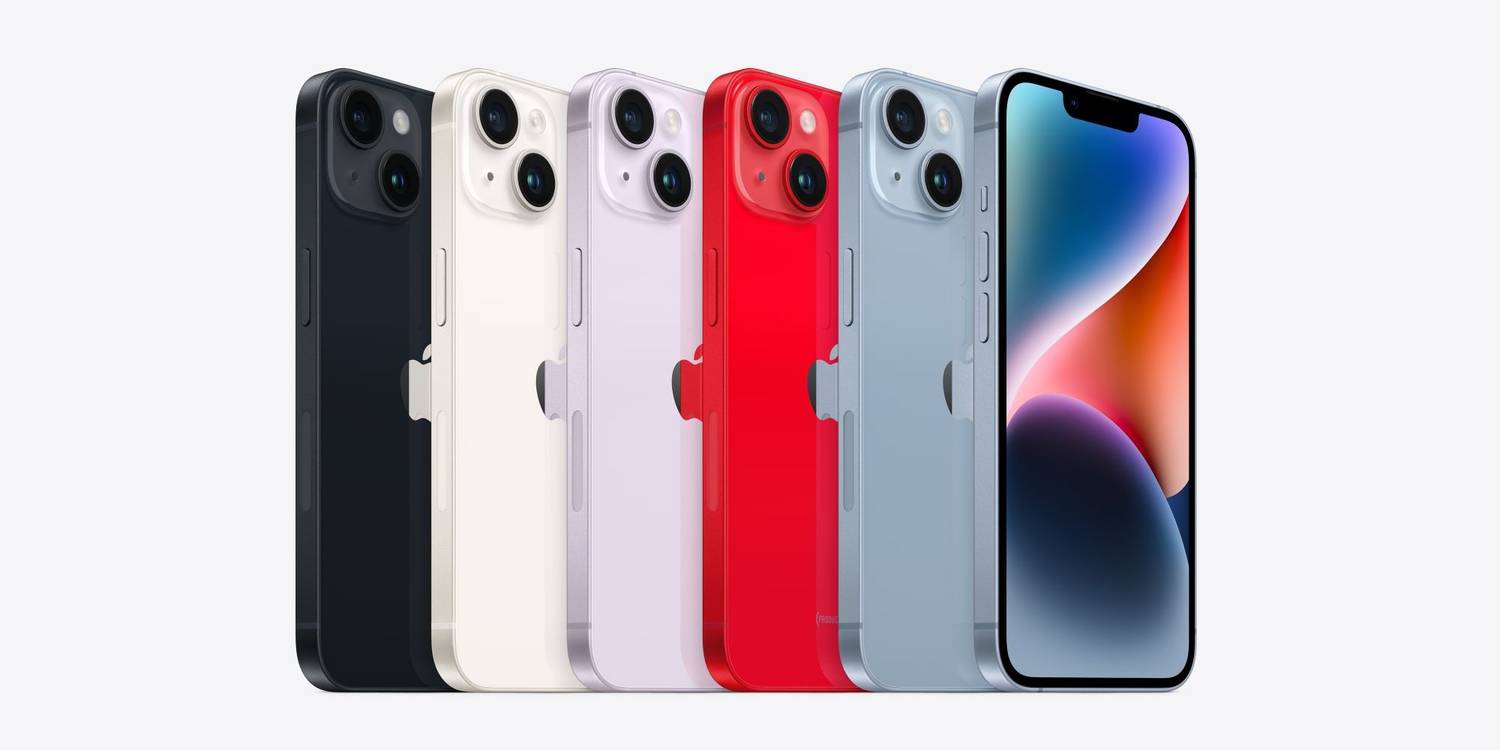
As for the cameras, the iPhone 14 improves upon the iPhone 13's 12MP primary camera with a larger f/1.5 aperture. The iPhone 14 Pro Max on the other hand gets an all-new 48MP main camera. The sensor uses pixel binning to output 12MP photos, but users can shoot in full resolution if they prefer. Both the iPhones feature a 12MP ultra-wide camera, although the iPhone 14 Pro Max also includes a third 12MP telephoto sensor. All the iPhone 14 models get an upgraded autofocus front camera and the new 'Photonic Engine' that improves image quality in lower lighting. Coming to the color options, iPhone 14 comes in Blue, Purple, Midnight, Starlight, and (Product) Red, while the iPhone 14 Pro Max is available in Deep Purple, Gold, Silver, and Space Black shades.

The iPhone 14 starts at $799, while the iPhone 14 Pro Max starts at $1,099. There's a $300 difference in the price of each variant, so which one should you buy? The iPhone 14 Pro Max gets most of the upgrades, including the Dynamic Island notch, Always On display, 120Hz refresh rate, faster A16 Bionic chipset, and powerful 48MP camera. The iPhone 14 misses out on all these features, but gets some upgrades such as the new Crash Detection and Satellite Emergency SOS features. For most users, saving money and buying the iPhone 14 (or iPhone 14 Plus, if a bigger display and battery are important) seems like the sensible choice. For those who want the most advanced features, particularly when it comes to cameras, the iPhone 14 Pro Max is worth the investment.

Read More Comments

How Long Does The iPhone 14 & iPhone 14 Pro Battery Last?

How Long Does The iPhone 14 & iPhone 14 Pro Battery Last?

The iPhone 14 is here, and users interested in upgrading to Apple's latest iPhones will want to know how long the battery on the new models lasts. Like the iPhone 12 and 13 series, the iPhone 14 lineup also includes four iPhones. This comprises the regular iPhone 14, iPhone 14 Plus, iPhone 14 Pro, and iPhone 14 Pro Max. There's no mini model this time around, with Apple ditching it for the big-screen iPhone 14 Plus.

The iPhone 12 mini was the first mini iPhone, launched back in 2020. While the model did not do as well as the standard iPhone 12, Apple launched its successor the following year in the form of the iPhone 13 mini. With disappointing sales a second time around, it made sense for Apple to axe the compact iPhone from its lineup. The good news is that the iPhone 13 mini has not yet been discontinued, and is still available to buy on the official Apple website.

The iPhone 13 did pretty well in terms of battery life, and the iPhone 14 improves it further. To start with, the standard iPhone 14 offers up to 20 hours of video playback and up to 80 hours of audio playback. In comparison, the iPhone 13 offers up to 19 hours of video playback and 75 hours of audio playback. As for the new entrant in the lineup, iPhone 14 Plus promises up to 26 hours of video playback and up to 100 hours of audio playback, which is more than what the company claims for the iPhone 14 Pro. The credit for this goes to the iPhone 14 Plus' large form factor, which allowed Apple to include a bigger battery.


What About The iPhone 14 Pro Models?


Those who purchase the iPhone 14 Pro can expect up to 23 hours of video playback and 75 hours of audio playback, similar to the iPhone 13 Pro. Coming to the most expensive iPhone in the lineup, the iPhone 14 Pro Max is rated to last for 29 hours of video playback and 95 hours of audio playback. These numbers provide an idea about how long the latest iPhone 14 models will last while playing videos or listening to audio, but what about day-to-day usage? Given that the iPhone 13 models easily last an entire day on moderate use, the iPhone 14 series will be no different, with the iPhone 14 Plus and iPhone 14 Pro Max being the ones to consider for those who want the longest battery life.

Users should know that the effective battery life of any smartphone depends upon several factors, including but not limited to the battery capacity, power efficiency of the chipset, and more. Over the years, Apple has mastered hardware-software optimization to provide decent battery life despite a smaller battery capacity. Therefore, even with the most powerful processors and brightest displays, the latest iPhone 14 devices should be able to outperform the benchmark set by the iPhone 13 series.

Read More Comments

Do The iPhone 14 & iPhone 14 Plus Have 120Hz Displays?

iphone 14 and 14 plus have 120hz display

Apple's new iPhone 14 and iPhone 14 Plus come with great displays, but do they have 120Hz refresh rates? The iPhone 14 lineup was announced at Apple's 'Far Out' event where the company also launched a number of other devices, including the Watch Series 8, Watch Pro, Watch SE (2022), and AirPods Pro 2.

The iPhone 14 series is the follow-up to the iPhone 13 lineup that launched last year to a warm reception from buyers. Like last year's lineup, the iPhone 14 series also includes four different models, but Apple decided to ditch the 'mini' this year in favor of the large-screen 'Plus' model in keeping with consumer demand for bigger displays. As a result, the four models in this year's lineup include the iPhone 14, iPhone 14 Plus, iPhone 14 Pro, and iPhone 14 Pro Max.

While the two 'Pro' models come with 120Hz ProMotion screens with adaptive refresh rates that can even go down as low as 1Hz to save battery, the display panels on the regular iPhone 14 and iPhone 14 Plus have the standard 60Hz refresh rate like the vanilla iPhone 13. In fact, the iPhone 14 Pro and Pro Max come with a number of significant upgrades over the non-Pro models, including a more powerful A16 Bionic chipset and the Dynamic Island, a pill-shaped notch that also displays notifications.


iPhone 14 and 14 Plus Display Features


While the iPhone 14 and 14 Plus miss out on 120Hz displays, they still offer some notable display features, including HDR support, True Tone colors, and a wide P3 color gamut. The panels also come with a 20,00,000:1 contrast ratio, offer 1,200 nits of peak brightness (HDR), and have an oleophobic coating to reduce fingerprints and smudges. However, the base models miss out on the always-on display which is reserved for the Pro models.

While most smartphones in the entry-level segment continue to ship with 60Hz panels, 120Hz is becoming increasingly more common in the mid-range for Android smartphones. Samsung, Motorola, Xiaomi, and a host of other vendors are already shipping multiple mid-range smartphones with 120Hz panels, while many premium Android devices these days feature AMOLED panels with 144Hz refresh rates. In fact, the Asus ROG Phone 6 and ROG Phone 6 Pro ship with a 165Hz displays, making them the first smartphones to offer the feature. While Apple has never competed with Android vendors on specs, the inclusion of a 120Hz panel on the $799 iPhone 14 would have surely increased its appeal over similarly-priced Android devices.

Read More Comments

What Does The Action Button On The Apple Watch Ultra Do?

What Does The Action Button On The Apple Watch Ultra Do?

Among the many features of the Apple Watch Ultra is an orange button on the left side called the Action Button, but what purpose does it serve? The new Apple Watch Ultra is Apple's most capable smartwatch yet. Apple has gone all out with the new watch, which is made from premium materials, has a bigger, brighter display, and boasts double the battery life when compared to other Apple Watch models.

Alongside the Apple Watch Ultra, Apple also announced the Apple Watch Series 8 and the Apple Watch SE 2. The former, which starts at $399 is available in 41mm and 45mm versions, while the latter comes in 40mm and 44mm sizes and has a $249 starting price. The Apple Watch Ultra on the other hand is available in a single 49mm size and is priced at $799.

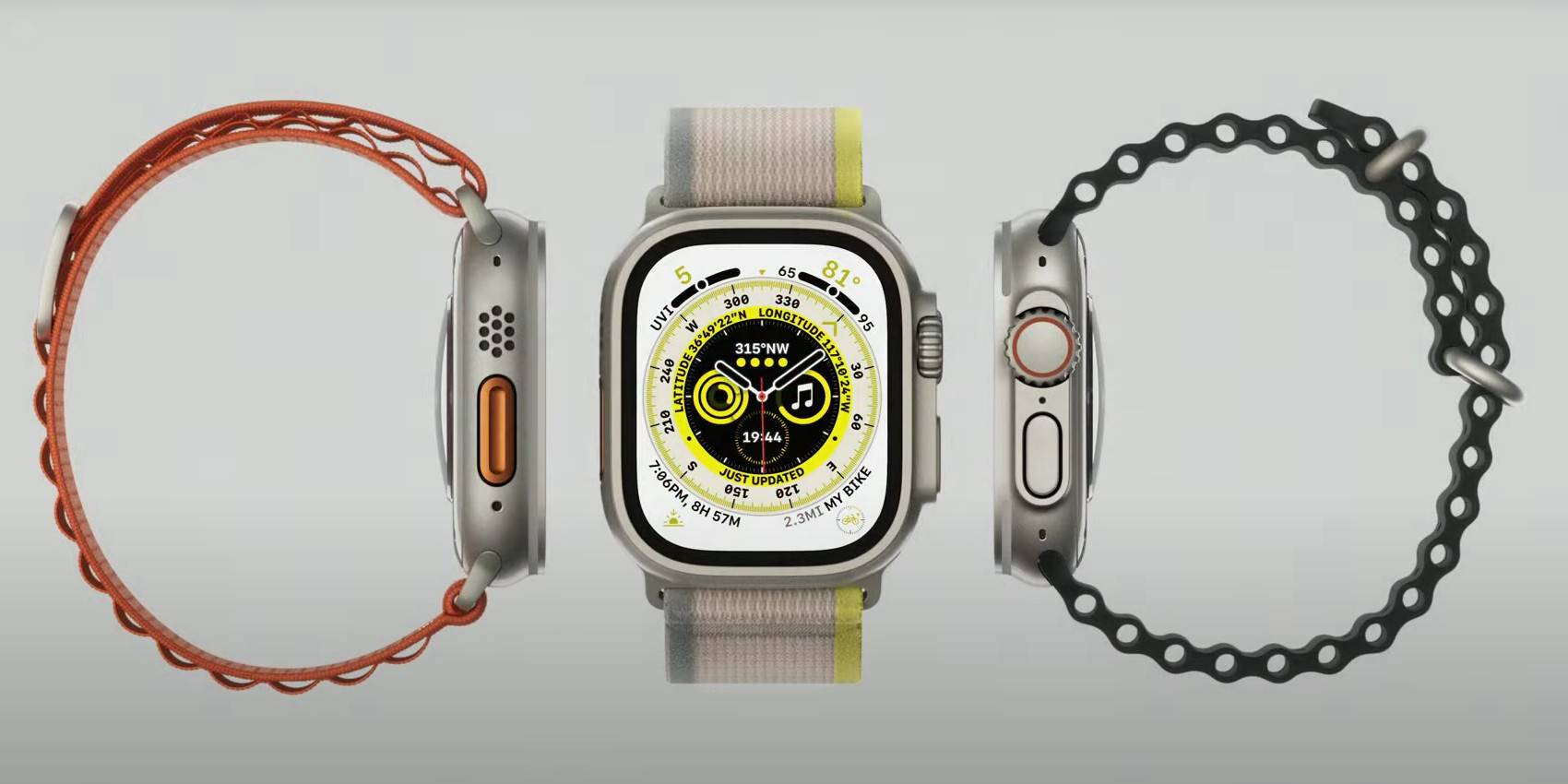
Coated in a color called 'International Orange,' the Action Button sits on the left side of the Watch Ultra's case, in between the speakers and the siren. The pill-shaped button has a groove, and is customizable which means it can perform a variety of functions depending on how the user configures it. For starters, pressing and holding the button will activate the siren which plays an 86-decibel sound that can be heard from up to 600 feet (180 meters) away. This sound from the siren makes it easier to locate a user during an emergency. Apple also states that pushing the Action Button will begin a workout.


The Action Button Is Customizable

Pressing the Action Button during a duathlon or triathlon will transition from one leg of the race to the next. The Action Button can also be customized to mark a segment during a race or make a compass waypoint when pressed. Furthermore, it can be set to start 'Backtrack,' which uses GPS data to create a path of where a user has been so that they can retrace their steps when lost. Divers can also push the button to begin tracking a dive.

The other side of the Apple Watch Ultra houses the Digital Crown and the Side Button, but even these are not like the ones on previous Apple Watch models or the new Apple Watch Series 8. The digital crown on the Watch Ultra is larger and coarser to make it easier to turn. Also, the side button protrudes to make it usable while wearing gloves. Clearly, Apple has put a fair bit of thought into making all the buttons and controls of the Apple Watch Ultra as accessible as possible during outdoor activities.

Read More Comments

All The New iPhone 14 Pro And 14 Pro Max Cameras Features


Excited about the release of the iPhone 14 Pro models and want to know what upgrades Apple made to camera features? There is no better way to kick off the fall than with a new iPhone. Apple has a record of releasing the next evolution of the popular device around this time of the year. Some fans look forward to a fresh design, others geek out over upgraded technology and the creatives look forward to a more powerful camera.

The iPhone began its reign as a top mobile device competitor with the first generation's revolutionary design and functionalities. However, in recent years Apple has had a hard time living up to people's expectations and delivering yawn-worthy material. This opinion changed when the iPhone 12 Pro Max and iPhone 13 introduced new camera abilities. Last year, the iPhone 13 was released with larger sensors and enhanced sensor-shift stabilization. Additionally, the iPhone 13 upgraded the aperture, enhancing zoom and macro capabilities.

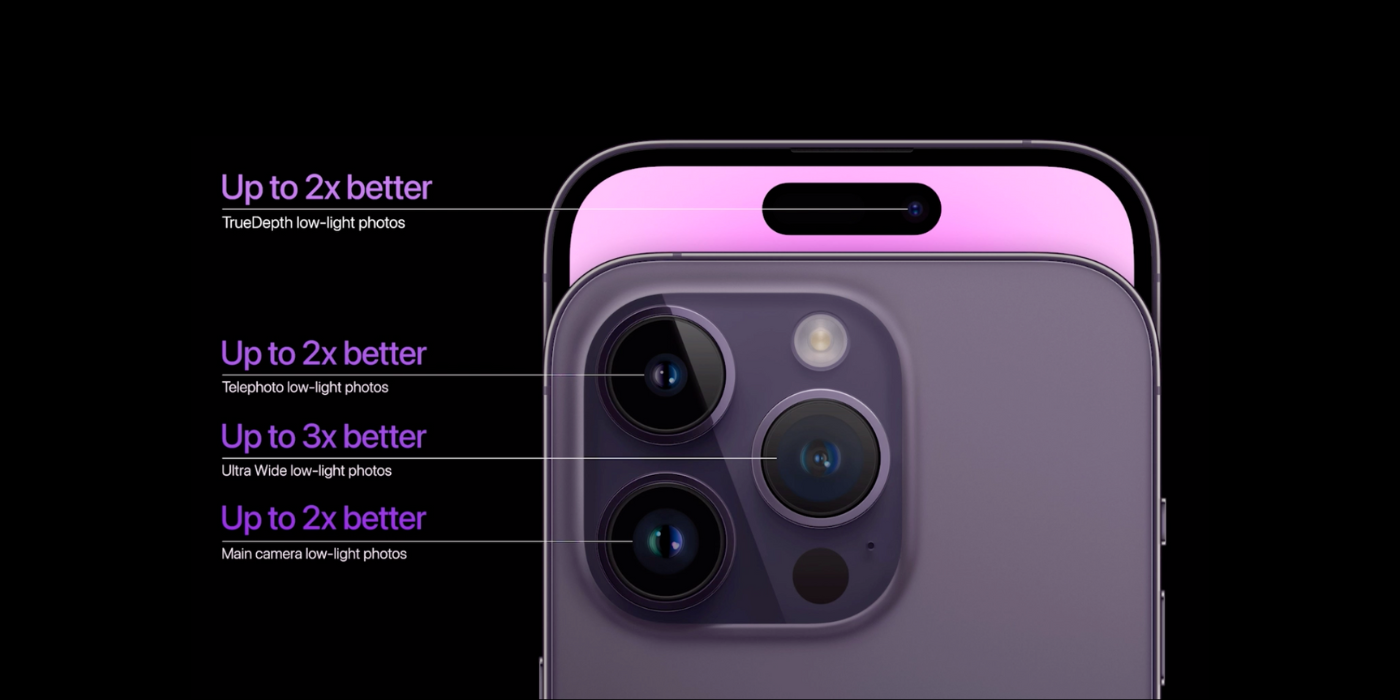
Apple's iPhone 14 Pro and Pro Max included some impressive advancements for photographers this year. iPhone 14 Pro users will discover that the topnotch has been reinvented. Now, the front lens has been replaced by Apple's new TrueDepth camera, offering a smaller size and capable of fitting the proximity sensor behind the display. The TrueDepth camera frees up a considerable amount of screen real estate. More importantly, it makes way for iPhone's newest feature, Dynamic Island. But, the true might of the iPhone Pro model camera performance is powered by the A16 Bionic Chip. Built on a four-nanometer process, the Pro models deliver efficient and powerful performance. The following features take advantage of this strength. Starting with the iPhone 14 Pro series primary camera, the sensor is 65 percent larger than the iPhone 13 pro models. Included are the 2nd-generation sensor-shift OIS and 100 percent Focus Pixels. Impressively, the lens also features a 24mm focal length, offering more versatility when shooting stunning landscapes, group shots and single subjects. Next, the Quad-pixel Sensor is an exciting feature. This sensor groups every four pixels into one large pixel. Hence, the name. But this provides four times more light while delivering a 12MP photo size. In addition, the new Photonic Engine achieves up to two times low-light improvement for photos over the iPhone 13. Combining the Photonic Engine with the Quad-Pixel Sensor will surely capture exceptional images.


ProRAW And ProRes


Incorporated is an added 2x Telephoto option to deliver a full-resolution photo and 4k video with optical quality. Additionally, the Telephoto comes with a 1.22um pixel size and a faster f/1.78 aperture. This new sensor is used to optimize for detail in ProRAW. As a result, ProRAW gives photographers complete creative freedom over sharpening, white balance and advanced tone mapping. Excitingly, the ProRAW now shoots at 48MP resolution for greater editing flexibility. Imagine seeing all the details and no noise.

Heading into the video, the iPhone is the only smartphone to shoot in ProRes and feature an end-to-end workflow with Dolby Vision HDR. The iPhone 14 also comes with a new Action Mode, with top-of-the-line stabilization. In addition, the Cinematic Mode supports up to 4k resolution at 30fps or a choice to shoot at 4k at 24fps. Simply put, the camera can capture some fantastic footage.

Apple is pushing limits on what a small device can achieve. The iPhone 12 and 13 Pro series laid some serious groundwork for this year's models. The iPhone 14 Pro and Pro max come with advanced technology, allowing the brand to remain at the top of photography phones. As Apple says in their promotion, they are redefining what a smartphone means.

Read More Comments

Apple Watch Ultra: What’s The Battery Life?

Apple Watch Ultra: What’s The Battery Life?

Apple has expanded its watch lineup with a new entry called the Apple Watch Ultra, but what's the battery life like? Before the Apple launch event, there were multiple reports that Apple was planning a pro smartwatch designed for the outdoors. Expected to launch as the Apple Watch Pro, it was a surprise when Apple announced it as the Apple Watch Ultra.

The new smartwatch has many features that make it stand out from its siblings. It has double the water resistance, a stronger build, dual-frequency GPS, a special watch face, a built-in siren, extra microphones and an additional physical key called the Action button.

The Apple Watch Ultra is Apple's biggest smartwatch to date. It packs the largest and brightest display (up to 2000 nits) ever on an Apple Watch. And to drive that display, it is only fair that there's an equally large battery that can keep it going and not leave users hanging dry. While Apple doesn't state the battery capacity, it mentions multiple battery stats. For starters, Apple has revealed that the battery life of the Apple Watch Ultra goes up to 36 hours on a single charge, which goes up to 60 hours in low power settings mode.


Double The Battery Life Of The Apple Watch Series 8


For comparison, the Apple Watch Series 8 has a battery life of 18 hours which users can extend to 36 hours in low power mode. Unfortunately, out of the box, the battery optimization feature that extends the battery life to 60 hours isn't available. However, Apple says it will be made available via an OTA update. Although the Apple Watch Ultra is designed mainly for athletes and adventurers, anyone who wants an Apple Watch with the best battery life will find it suitable too. However, its $799 price tag is double that of the Apple Watch Series 8.

While the Apple Watch Ultra holds the crown of the Apple Watch with the best battery life, it pales in comparison to other rugged smartwatches. These include the Amazfit T-Rex 2, which has a battery life of up to 24 days, and the Garmin Fenix 7, which can last up to 18 days on a single charge. Garmin even offers a solar version that goes up to 22 days on a single charge. Another rival of the Apple Watch Ultra is Samsung's Galaxy Watch 5 Pro, which has a battery life of 50 hours and can even go up to 80 hours.

Read More Comments